PDF Protector2.0.2
Publisher Description



Protect your PDF documents with ease.
PDF Protector is a simple and powerful tool for encrypting and decrypting PDF files. Secure your documents with industry-standard password protection to prevent unauthorized access.
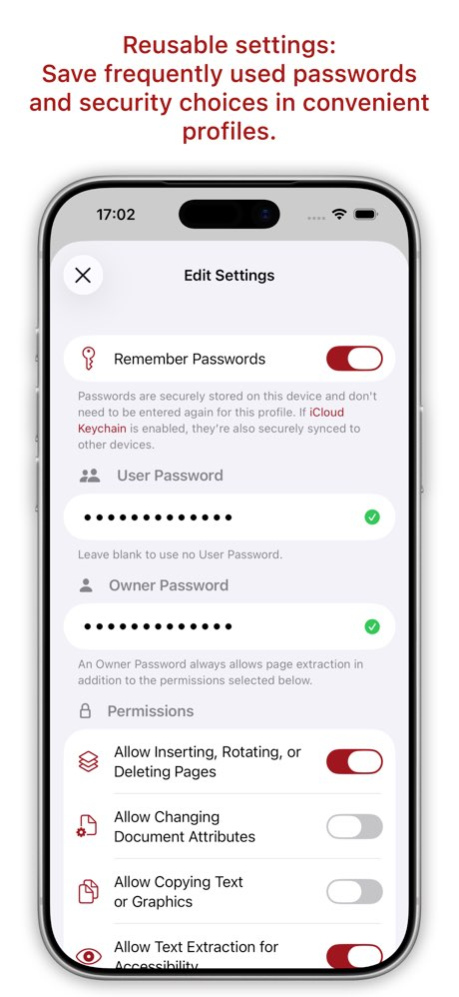
Set an open password and optionally restrict printing, copying, or content extraction to keep sensitive information safe.
If you know the correct password, PDF Protector can also remove existing security settings and decrypt your PDF files.
Features
* Secure PDF files with industry-leading 256-bit AES encryption
* Set an open password to secure your documents
* Restrict printing, copying, and content extraction
* Decrypt protected PDFs and remove password protection
* Create reusable security profiles
* Protect one or multiple PDF files at once
* Fast, intuitive, and easy to use
* Compatible with standard PDF readers
Whether you’re protecting business documents, personal records, contracts, or confidential files, PDF Protector helps you secure your PDFs quickly and reliably.
Version History FIX: Fixed an issue where encrypting certain PDFs could cause text to display with incorrect characters.
FIX: Fixed an issue where the Encrypt button might remain unavailable after changing encryption settings for an already processed file.
FIX: Fixed an issue where files could not be saved or exported after changing settings and encrypting them again. 2.0.2 Aug 9 NEW: More secure AES‑256 is now fully supported for all PDF files.
NEW: A default save location can now be set for each profile, but it isn’t synced via iCloud. You’ll need to set it on each device if you use PDF Protector on multiple devices.
FIX: PDF Protectos did prevent printing although the print quality was set to low in the profile. 2.0.1 Aug 3 2.0 Jun 30
About PDF Protector
The company that develops PDF Protector is Daniel Witt. The latest version released by its developer is 2.0.2.
To install PDF Protector on your iOS device, just click the green Continue To App button above to start the installation process. The app is listed on our website since 2026-10-08 and was downloaded 0 times. We have already checked if the download link is safe, however for your own protection we recommend that you scan the downloaded app with your antivirus. Your antivirus may detect the PDF Protector as malware if the download link is broken.
How to install PDF Protector on your iOS device:
- Click on the Continue To App button on our website. This will redirect you to the App Store.
- Once the PDF Protector is shown in the iTunes listing of your iOS device, you can start its download and installation. Tap on the GET button to the right of the app to start downloading it.
- If you are not logged-in the iOS appstore app, you'll be prompted for your your Apple ID and/or password.
- After PDF Protector is downloaded, you'll see an INSTALL button to the right. Tap on it to start the actual installation of the iOS app.
- Once installation is finished you can tap on the OPEN button to start it. Its icon will also be added to your device home screen.
Program Details
System requirements
Download information
Pricing
Version History
version 2.0.2
posted on 2026-10-08
Version History FIX: Fixed an issue where encrypting certain PDFs could cause text to display with incorrect characters.
FIX: Fixed an issue where the Encrypt button might remain unavailable after changing encryption settings for an already processed file.
FIX: Fixed an issue where files could not be saved or exported after changing settings and encrypting them again. 2.0.2 Aug 9 NEW: More secure AES‑256 is now fully supported for all PDF files.
NEW: A default save location can now be set for each profile, but it isn’t synced via iCloud. You’ll need to set it on each device if you use PDF Protector on multiple devices.
FIX: PDF Protectos did prevent printing although the print quality was set to low in the profile. 2.0.1 Aug 3 2.0 Jun 30
version 2.0.2
posted on 2026-08-13
Version History FIX: Fixed an issue where encrypting certain PDFs could cause text to display with incorrect characters.
FIX: Fixed an issue where the Encrypt button might remain unavailable after changing encryption settings for an already processed file.
FIX: Fixed an issue where files could not be saved or exported after changing settings and encrypting them again. 2.0.2 3d ago NEW: More secure AES‑256 is now fully supported for all PDF files.
NEW: A default save location can now be set for each profile, but it isn’t synced via iCloud. You’ll need to set it on each device if you use PDF Protector on multiple devices.
FIX: PDF Protectos did prevent printing although the print quality was set to low in the profile. 2.0.1 Aug 3 2.0 Jun 30
